
Pic to Text technology, also known as Optical Character Recognition (OCR), has revolutionized the way we extract textual information from images. In today’s digital era, users often need to convert images of documents, notes, or printed material into editable text quickly. While high-quality images yield excellent results, many users encounter the challenge of low-quality photos. These images may be blurry, poorly lit, or captured at a low resolution, raising questions about the effectiveness of Pic to Text tools. Understanding how these technologies perform under less-than-ideal conditions is crucial for realistic expectations.
Low-quality photos are increasingly common in everyday situations. People frequently use smartphones or cameras in suboptimal lighting, or they may scan old documents that have faded over time. The quality of the source image significantly influences the accuracy of text extraction, and Pic to Text systems must often contend with noise, distortion, and missing details. In this article, we will explore how Pic to Text works, factors that affect its performance on low-quality images, techniques to improve accuracy, and the latest advancements in OCR technology.
What is Pic to Text Technology?
Pic to Text is a process that converts visual information from an image into machine-readable text. The technology uses Optical Character Recognition (OCR), a field of computer vision and artificial intelligence, to analyze patterns, shapes, and features within an image. OCR systems can recognize printed text, handwritten notes, or even stylized fonts and convert them into editable formats such as Word documents, PDFs, or plain text files.
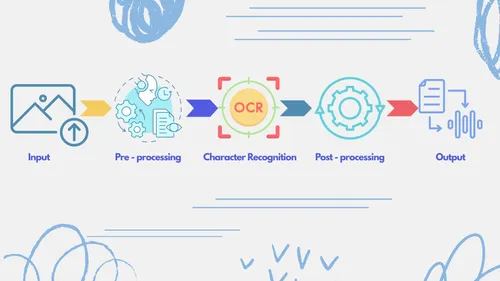
The process typically involves several key steps:
- Image Preprocessing: Enhancing the image quality, adjusting contrast, and reducing noise.
- Text Detection: Identifying areas within the image that contain text.
- Character Recognition: Analyzing each detected text area and interpreting individual characters.
- Post-processing: Correcting errors and formatting the output text.
While modern OCR systems are highly sophisticated, their performance depends on the quality of the source image. High-resolution, well-lit, and clear images provide the best results, but real-world scenarios often involve low-quality photos that challenge these systems.
Factors Affecting Pic to Text Accuracy on Low-Quality Photos
The accuracy of Pic to Text technology on low-quality images depends on several interrelated factors. Understanding these factors can help users take measures to improve results or set realistic expectations.
Resolution of the Image
The resolution of an image plays a crucial role in text recognition. Higher resolution images contain more detail, allowing OCR systems to distinguish between similar characters. Low-resolution images may result in blurred or pixelated text, leading to misinterpretation. For instance, letters like “O” and “0” or “l” and “1” can easily be confused when the image resolution is poor.
Lighting Conditions
Poor lighting can introduce shadows, glare, or uneven illumination, all of which negatively affect text recognition. OCR algorithms rely on clear contrast between text and background. Low-light or overexposed images can obscure text details and reduce overall accuracy.
Text Orientation and Skew
Images captured at angles or with tilted text lines can pose a challenge to OCR systems. Low-quality photos often include skewed or rotated text, making it difficult for algorithms to correctly detect and interpret characters. Many OCR tools include skew correction features, but extreme angles may still reduce accuracy.
Noise and Artifacts
Noise, grain, or compression artifacts are common in low-quality photos. These distortions can confuse text recognition algorithms, leading to errors such as missing characters or incorrect words. Reducing noise through preprocessing techniques can improve accuracy.
Font Type and Size
OCR systems perform better on standard fonts with consistent spacing and size. Unusual, decorative, or handwritten fonts in low-quality images can significantly decrease accuracy. Small fonts or characters close together are particularly challenging when the image is blurry.
Techniques to Improve Accuracy on Low-Quality Photos
Despite the limitations of low-quality images, there are several strategies and tools that can enhance Pic to Text performance.
Image Enhancement
Preprocessing the image to enhance quality can dramatically improve OCR results. Techniques include:
- Contrast adjustment: Increasing the difference between text and background.
- Noise reduction: Using filters to remove grain or artifacts.
- Sharpening: Making the edges of characters clearer.
Many OCR tools now include automatic image enhancement features.
Rescanning or Rephotographing
If possible, capturing a better image is often the most effective solution. Using proper lighting, keeping the camera steady, and ensuring a high-resolution capture can reduce errors.
Skew and Perspective Correction
OCR software often allows users to correct the orientation of text. By straightening skewed text, the system can recognize characters more accurately.
Using Advanced OCR Tools
Some modern OCR tools leverage artificial intelligence and machine learning to handle low-quality images better than traditional algorithms. These tools can:
- Infer missing or unclear characters.
- Recognize handwritten or stylized text.
- Correct common OCR errors automatically.
Manual Post-Processing
Even with advanced tools, manual proofreading is often necessary. Low-quality images may produce minor errors that require human intervention for complete accuracy.
Applications of Pic to Text on Low-Quality Photos
Pic to Text technology is widely used in various domains, and its effectiveness on low-quality images expands its practical applications:
Digitizing Historical Documents
Many historical texts and old manuscripts exist only in low-quality scans or photographs. Pic to Text allows researchers to convert these materials into searchable and editable digital formats, preserving knowledge that would otherwise be difficult to access.
Business and Office Automation
Businesses often need to process invoices, receipts, and forms quickly. Low-quality photos from smartphones are common in remote work environments, and OCR enables efficient extraction of information for bookkeeping and data analysis.
Accessibility
For visually impaired users, Pic to Text technology allows images containing text to be read aloud using text-to-speech software. Even if the original images are of low quality, enhanced OCR can make information more accessible.
Academic Research
Students and researchers frequently capture photos of whiteboards, textbooks, or notes. Pic to Text helps convert these images into editable text, saving time and effort, even if the images are less than perfect.
Limitations of Pic to Text on Low-Quality Photos
Despite significant advancements, OCR technology still faces challenges with low-quality images:
- Reduced Accuracy: Blurry, dark, or skewed images often result in misrecognized characters.
- Handwriting Recognition: Low-quality photos of handwritten text are particularly challenging.
- Complex Layouts: Tables, diagrams, or multi-column text may be interpreted incorrectly.
- Language and Script Limitations: OCR performance may vary across different languages or scripts, especially when low-quality images obscure key features.
Understanding these limitations is crucial for users who rely on OCR for critical tasks.
Future of Pic to Text Technology
The future of Pic to Text on low-quality images is promising. Advances in AI and deep learning are enabling OCR systems to:
- Predict Missing Characters: Neural networks can infer text even when parts of characters are obscured.
- Handle Diverse Scripts: Improved models can process multiple languages and non-Latin scripts more accurately.
- Integrate with Mobile Apps: Smartphone apps now offer real-time text extraction, even in challenging conditions.
- Combine with Natural Language Processing (NLP): Post-processing using NLP can correct context-based errors and improve overall output quality.
As these technologies evolve, the gap between OCR performance on high-quality and low-quality images is expected to narrow significantly.
Conclusion
Pic to Text technology continues to transform how we interact with textual information in digital images. While low-quality photos present inherent challenges, modern OCR systems, AI-powered enhancements, and preprocessing techniques can significantly improve accuracy. Users can take practical steps such as image enhancement, proper lighting, and post-processing to maximize results. Despite some limitations, Pic to Text remains an invaluable tool for digitizing documents, automating business processes, supporting accessibility, and facilitating academic research. As AI and computer vision continue to advance, the capability to extract text from low-quality images will become increasingly reliable and efficient, making this technology more accessible and practical for everyday use.